£5+VAT
(£6.00 inc.VAT)
Document
- Instant access
- 4 pages
- Online editor
- Your business name
- Edit for 30 days
- PDF download
Membership
- 830+ documents
- Individual plans
- Team plans
- Your business logo
- Unlimited edits
- Fully branded
Create your document in minutes with this ready to use electrical isolation and lock off permit to work template. Use the quick and easy editor to add your details, make changes, and download a completed document branded with your business name.
Need to document the safe isolation and lock-off of electrical equipment or circuits?
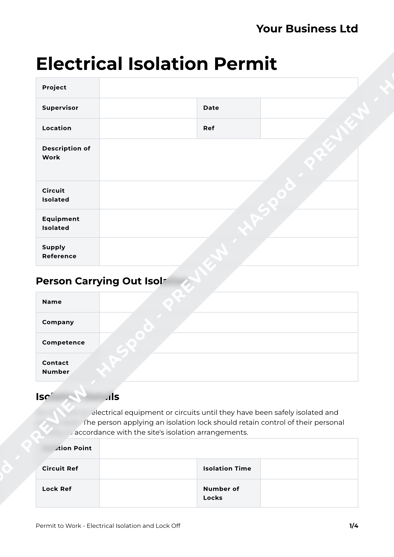
This Electrical Isolation and Lock-Off Permit Template provides a practical starting point for documenting the isolation of electrical equipment, circuits or systems before work is carried out.
⚡️ Want more electrical health and safety templates? This template is included in our Electrician Health and Safety Document Pack, which gives you 1 year’s access to a discounted bundle of electrical RAMS, permits, and forms for your projects.
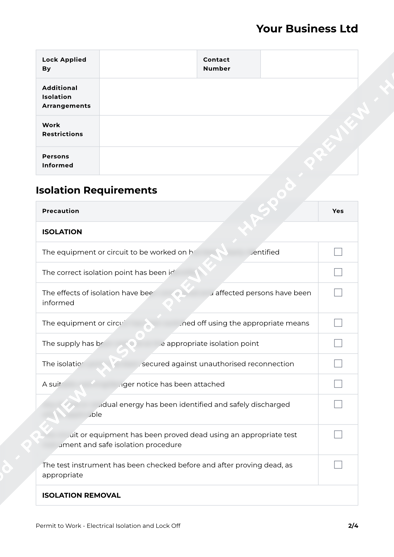
The template helps record key information about the electrical isolation, including the equipment or circuit being isolated, isolation points, lock-off arrangements, identification and verification of the isolation, persons responsible and authorisation for the work.
It can be used for electrical installation, maintenance, repair and other work where electrical equipment or circuits need to be safely isolated and secured against inadvertent re-energisation.
The template can be adapted to suit the particular electrical system, equipment, work activity and circumstances, helping you create a site-specific Electrical Isolation and Lock-Off Permit.
The template guides you through the key information needed to complete your electrical isolation and lock off permit to work. You'll have 30 days' access to the online template, with the option to download your completed permit to work document as a non-editable PDF to keep, share and use within your business, with your business name displayed in the header of each page.
This 4 page document includes:
This Electrical Isolation and Lock Off Permit to Work template can be edited online within your browser. Editing is quick and simple, but if you need more time, there's no hurry to finish your document today - you get 30 days use of the template and online editor to create your document.
When you complete your order, the document can be found in your account under 'Documents'. You can edit the document online from your HASpod account.
Download in PDF format for maximum compatibility across devices - no special software required. Once downloaded you can save, print and use your Electrical Isolation and Lock Off Permit to Work document within your business for as long as you need it.
After making your edits, click the download button to get your PDF - we will add your business name in the header for you.
Get unlimited access to every document on the Documents Plan.